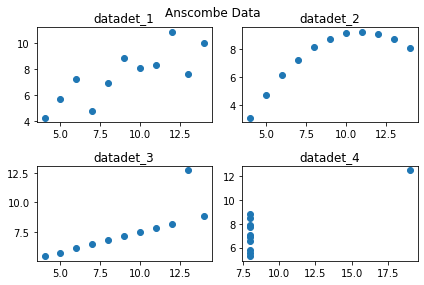
Anscombe's quartet is made up of four groups.
Statistical values such as mean, variance, and regression line of each group of data look like the same,
but when these figures are visualized, they all have different meanings.
1. Use anscombe data
Code:
import seaborn as sns
anscombe=sns.load_dataset("anscombe")
print(anscombe)
print(type(anscombe))
Result:

2. Make graph with anscombe data
Code:
import matplotlib.pyplot as plt						#use matplotlib
dataset_1=anscombe[anscombe['dataset']=='I']		#extract 'I' group data
dataset_2=anscombe[anscombe['dataset']=='II']		#extract 'II' group data
dataset_3=anscombe[anscombe['dataset']=='III']		#extract 'III' group data
dataset_4=anscombe[anscombe['dataset']=='IV']		#extract 'IV' group data

fig=plt.figure()									#make fig
axes1=fig.add_subplot(2,2,1)						#make 2x2 1st subplot
axes2=fig.add_subplot(2,2,2)						#make 2x2 2st subplot
axes3=fig.add_subplot(2,2,3)						#make 2x2 3st subplot
axes4=fig.add_subplot(2,2,4)						#make 2x2 4st subplot

axes1.plot(dataset_1['x'],dataset_1['y'],'o')		#data input with point option 'o'
axes2.plot(dataset_2['x'],dataset_2['y'],'o')		#data input with point option 'o'
axes3.plot(dataset_3['x'],dataset_3['y'],'o')		#data input with point option 'o'
axes4.plot(dataset_4['x'],dataset_4['y'],'o')		#data input with point option 'o'

fig.suptitle("Anscombe Data")						#set subtitle
axes1.set_title("datadet_1")						#set title
axes2.set_title("datadet_2")						#set title
axes3.set_title("datadet_3")						#set title
axes4.set_title("datadet_4")						#set title

fig.tight_layout()									#make pad
Result:
'AI Library > Pandas' 카테고리의 다른 글
| Graph Type (0) | 2021.11.15 |
|---|---|
| Seaborn Library (0) | 2021.11.14 |
| Matplotlib (0) | 2021.11.14 |
| Data Extract (0) | 2021.11.12 |
| Setting for Pandas (0) | 2021.11.12 |
