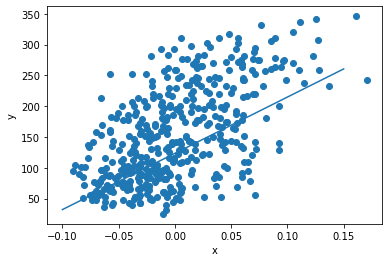
선형회귀 ----> 목적= "많은 데이터로 선긋기"
$$y=ax+b\ \ \ <->\ \ \hat{y}=wx+b$$
\[ \begin{align} &\hat{y}는 예측값 \\ &w는 가중치 \\ &y는 타켓 \end{align} \]
1. w, b값 선정
w=1,b=1일때,
\( \begin{align} \hat{y}&=wx+b \\&=1\cdot x\left[0\right]+1 \\ &\fallingdotseq 0.0619 \end{align} \)
2. w값 수정 (w 0.1 증가)
\( \begin{align} \hat{y}' &=w'x+b \\&=\left(1+0.1\right)x\left[0\right]+1 \\ &\fallingdotseq 0.0675 \end{align} \)
3. Gradient descent
\( \begin{align}1case 가중치 증가,예측값 증가->가중치\cdot (+1) \\ 2case 가중치 증가,예측값 감소->가중치\cdot (-1)\end{align} \)
err가 줄어드는 방향으로 1case과 2case중 선택
이 경우는 1case이므로 가중치에 양수를 더한다.
\( \begin{align} w_{rate} \end{align} \) 은 가중치가 변할때, 예측값의 변화율이다.
\( \begin{align} w_{rate}=\frac{\hat{y'}-\hat{y}}{w'-w}=\frac{\left(w'x+b\right)-\left(wx+b\right)}{\left(w+0.1\right)-w}=\frac{0.1}{0.1}\cdot x\left[0\right]=x\left[0\right] \end{align} \)
같은 방법으로
\( \begin{align} b_{rate}=1 \end{align} \)
경사하강법에 따라 가중치와 절편은 다음과 같다.
\( \begin{align} &w'=w+w_{rate}\\ &b'=b+1 \end{align} \)
4. BackPropagation
최적화를 위해 오차err를 곱하여 계산에 반영한다.
\( \begin{align} &w'=w+w_{rate}\cdot err\\ &b'=b+1\cdot err\\ &err=\hat{y}-y \end{align} \)
\( \begin{align} &x[0]\ \ \hat{y}=w'x+b',\left(10.25,150.0\right)\\ &x[1]\ \ \hat{y}=w'x+b'\ ,\left(14.13,75.5\right)\\ \end{align} \)
...
x[n]까지 반복 -> 에포크(epoch)
에포크 -> 100번 반복
최종 결과:
w=913, b=123
\[ \begin{align} y=913x+123 \end{align} \]
from sklearn.datasets import load_diabetes
diabetes = load_diabetes()
print(diabetes.data.shape, diabetes.target.shape) #(442, 10)(442,)

diabetes.data=
array([[ 0.03807591,  0.05068012,  0.06169621, ..., -0.00259226,
         0.01990842, -0.01764613],
       [-0.00188202, -0.04464164, -0.05147406, ..., -0.03949338,
        -0.06832974, -0.09220405],
       [ 0.08529891,  0.05068012,  0.04445121, ..., -0.00259226,
         0.00286377, -0.02593034],
       ...,
       [ 0.04170844,  0.05068012, -0.01590626, ..., -0.01107952,
        -0.04687948,  0.01549073],
       [-0.04547248, -0.04464164,  0.03906215, ...,  0.02655962,
         0.04452837, -0.02593034],
       [-0.04547248, -0.04464164, -0.0730303 , ..., -0.03949338,
        -0.00421986,  0.00306441]])
diabetes.target=
array([151.,  75., 141., 206., 135.,  97., 138.,  63., 110., 310., 101.,
        69., 179., 185., 118., 171., 166., 144.,  97., 168.,  68.,  49.,
        68., 245., 184., 202., 137.,  85., 131., 283., 129.,  59., 341.,
        87.,  65., 102., 265., 276., 252.,  90., 100.,  55.,  61.,  92.,
       259.,  53., 190., 142.,  75., 142., 155., 225.,  59., 104., 182.,
       128.,  52.,  37., 170., 170.,  61., 144.,  52., 128.,  71., 163.,
       150.,  97., 160., 178.,  48., 270., 202., 111.,  85.,  42., 170.,
       200., 252., 113., 143.,  51.,  52., 210.,  65., 141.,  55., 134.,
        42., 111.,  98., 164.,  48.,  96.,  90., 162., 150., 279.,  92.,
        83., 128., 102., 302., 198.,  95.,  53., 134., 144., 232.,  81.,
       104.,  59., 246., 297., 258., 229., 275., 281., 179., 200., 200.,
       173., 180.,  84., 121., 161.,  99., 109., 115., 268., 274., 158.,
       107.,  83., 103., 272.,  85., 280., 336., 281., 118., 317., 235.,
        60., 174., 259., 178., 128.,  96., 126., 288.,  88., 292.,  71.,
       197., 186.,  25.,  84.,  96., 195.,  53., 217., 172., 131., 214.,
        59.,  70., 220., 268., 152.,  47.,  74., 295., 101., 151., 127.,
       237., 225.,  81., 151., 107.,  64., 138., 185., 265., 101., 137.,
       143., 141.,  79., 292., 178.,  91., 116.,  86., 122.,  72., 129.,
       142.,  90., 158.,  39., 196., 222., 277.,  99., 196., 202., 155.,
        77., 191.,  70.,  73.,  49.,  65., 263., 248., 296., 214., 185.,
        78.,  93., 252., 150.,  77., 208.,  77., 108., 160.,  53., 220.,
       154., 259.,  90., 246., 124.,  67.,  72., 257., 262., 275., 177.,
        71.,  47., 187., 125.,  78.,  51., 258., 215., 303., 243.,  91.,
       150., 310., 153., 346.,  63.,  89.,  50.,  39., 103., 308., 116.,
       145.,  74.,  45., 115., 264.,  87., 202., 127., 182., 241.,  66.,
        94., 283.,  64., 102., 200., 265.,  94., 230., 181., 156., 233.,
        60., 219.,  80.,  68., 332., 248.,  84., 200.,  55.,  85.,  89.,
        31., 129.,  83., 275.,  65., 198., 236., 253., 124.,  44., 172.,
       114., 142., 109., 180., 144., 163., 147.,  97., 220., 190., 109.,
       191., 122., 230., 242., 248., 249., 192., 131., 237.,  78., 135.,
       244., 199., 270., 164.,  72.,  96., 306.,  91., 214.,  95., 216.,
       263., 178., 113., 200., 139., 139.,  88., 148.,  88., 243.,  71.,
        77., 109., 272.,  60.,  54., 221.,  90., 311., 281., 182., 321.,
        58., 262., 206., 233., 242., 123., 167.,  63., 197.,  71., 168.,
       140., 217., 121., 235., 245.,  40.,  52., 104., 132.,  88.,  69.,
       219.,  72., 201., 110.,  51., 277.,  63., 118.,  69., 273., 258.,
        43., 198., 242., 232., 175.,  93., 168., 275., 293., 281.,  72.,
       140., 189., 181., 209., 136., 261., 113., 131., 174., 257.,  55.,
        84.,  42., 146., 212., 233.,  91., 111., 152., 120.,  67., 310.,
        94., 183.,  66., 173.,  72.,  49.,  64.,  48., 178., 104., 132.,
       220.,  57.])
import matplotlib.pyplot as plt
x = diabetes.data[:, 2]
y = diabetes.target
w = 1.0
b = 1.0
for i in range(1, 100):
for x_i, y_i in zip(x, y):
y_hat = x_i * w + b
err = y_i - y_hat
w_rate = x_i
w = w + w_rate * err
b = b + 1 * err
print(w, b) #913.5973364345905 123.39414383177204
plt.scatter(x, y)
pt1 = (-0.1, -0.1 * w + b)
pt2 = (0.15, 0.15 * w + b)
plt.plot([pt1[0], pt2[0]], [pt1[1], pt2[1]])
plt.xlabel('x')
plt.ylabel('y')
plt.show()